How To Buy with Bitcoin

JUST FOLLOW THESE 2 STEPS:

Signup a Crypto Exchange, Ignore step 1 if you already have an exchange

Place your Order via Swisschems

BEST ALTERNATIVE:

BEFORE WITHDRAWING BITCOIN FROM CASH APP, ENSURE:

  • You have a verified Cash App account with Bitcoin enabled (you can buy or receive BTC via the app).
  •  You have an external Bitcoin wallet (e.g., a mobile wallet like Zengo, desktop wallet, or hardware like Ledger/Trezor) ready to receive the funds. This wallet will provide the QR code you’ll scan.
  •  Your wallet supports Bitcoin (BTC) on the main network—Cash App only sends via Bitcoin network.
  •  Be aware of fees: Cash App charges a variable fee (around 2% for small amounts) plus network fees. Check current fees in-app.
  •  Withdrawals are irreversible—double-check the QR code and amount to avoid loss.
  • STEP-BY-STEP INSTRUCTIONS
  • 1. Open Cash App and Navigate to Bitcoin:
    •  Launch the Cash App on your mobile device and log in.
    •  On the home screen, tap the Money tab (bottom-left icon, looks like a dollar sign).
    •  Tap Bitcoin (or the BTC icon) to access your Bitcoin balance.
    • 1
  • 2. Select Withdraw Bitcoin:
    •  Tap the Send button (airplane icon) or look for the Withdraw option under your BTC balance.
    •  Choose Bitcoin as the asset (toggle from USD to BTC if needed).
    • 1
  • 3. Enter the Amount:
    •  Input the amount of Bitcoin (BTC) you want to withdraw. You can specify in BTC or USD equivalent.
    •  Review the estimated fees and total cost displayed.
    • 1
  • 4. Scan the QR Code:
    •  In the recipient field, tap the QR scanner icon (usually in the top-left corner of the screen).
    •  Open your external Bitcoin wallet app and display the receiving QR code (this encodes your wallet’s public address).
    •  Point your phone’s camera at the QR code on your wallet screen to scan it. Cash App will automatically populate the wallet address.
    •  (Alternative: If scanning isn’t feasible, tap Send instead and manually paste the wallet address from your external wallet.)
    • 1
  • 5. Review and Confirm:
    •  Double-check the wallet address (first and last 4 characters should match your external wallet).
    •  Confirm the amount, fees, and destination.
    •  Enter your Cash App PIN, use Touch ID/Face ID, or complete two-factor authentication to authorize.
    • 1
  • 6. Complete the Withdrawal:
    •  Tap Confirm to send. The transaction will process on the Bitcoin network (may take 10–60 minutes, depending on congestion).
    •  Track status in Cash App under Activity > Bitcoin tab.
    • 1
  • TIPS AND WARNINGS:
  •  Minimum Withdrawal: Typically 0.00001 BTC (about $1 USD), but check in-app for current limits.
  •  Security: Only scan QR codes from trusted wallets. Never share your private keys or seed phrases.
  •  Taxes: Withdrawing may trigger taxable events—consult a tax advisor.
  •  Troubleshooting: If the scan fails, ensure good lighting and try manual entry. For issues, contact Cash App support via the app.
  •  Cashing Out to Fiat: If you meant converting BTC to USD and withdrawing to a bank, sell BTC first (under Bitcoin tab > Sell), then transfer USD to your linked bank.
  • 1
  •  
For the latest details, check Cash App’s official help center.

BITCOIN PROVIDERS:

  • We recommend  2 Providers in the US only –Binance US, and Cashapp. 
  • Depending on your country and payment method you can find other options on BuyBitcoinWorldwide.

Step 1

CASHAPP – UNITED STATES ONLY:  ***HIGHLY RECOMMEND*** 

Lorem ipsum dolor sit amet, consectetur adipiscing elit. Ut elit tellus, luctus nec ullamcorper mattis, pulvinar dapi

  • One of the more well-known Payment provider, is also can buy Bitcoin only, to use for shopping online. For fast ID approval use your Driver’s License.
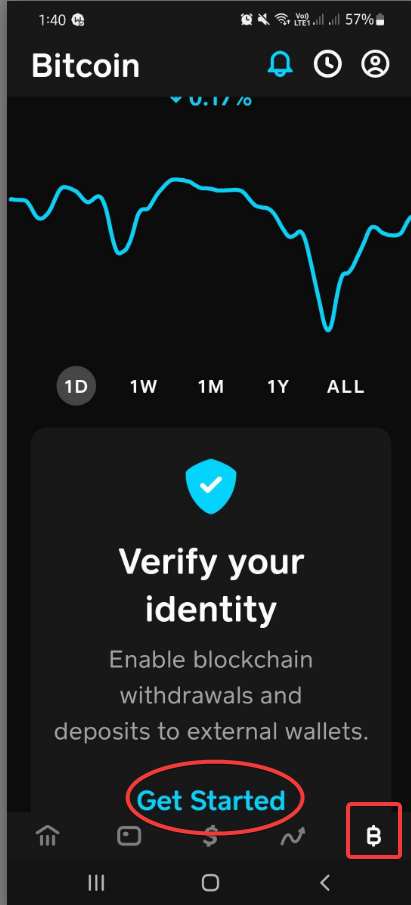
  • ● Choose Bitcoin, then Choose VERIFY YOUR IDENTITY
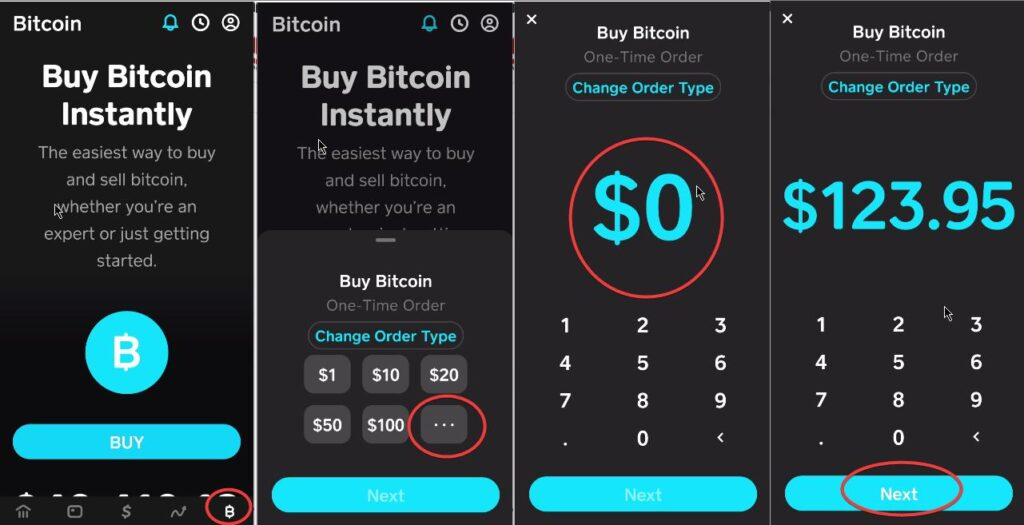
  • ● Go to the Bitcoin Tab and Buy Bitcoin to the amount of your order add a few USD for the network fees. (usually its about approx 2-5 USD)

bus leo.

  • You can withdraw Bitcoin from your Cash App to a third-party Bitcoin wallet at any time. To do so:
  • ● Toggle from USD to BTC by tapping “USD” on your Cash App home screen.
  • ● Select Bitcoin
  • ● Either tap the top left corner of the screen to access the QR code scanner or tap Send to enter the external wallet address manually
  • ● Tap wallet address to confirm
  • ● Tap Next
  • ● Select a withdrawal speed
  • ● Tap Confirm & Send to initiate your withdrawal.
  • If this is your first time withdrawing Bitcoin, you may need to enter some additional personal information before making a withdrawal.
  • You need to withdraw at least 0.001 bitcoin to make a withdrawal using the Standard withdrawal speed. Rush and Priority withdrawals have a 0.00005 bitcoin minimum withdrawal amount.
  • Once your Account is verified you can buy bitcoin and place an order.

Step 2

ORDER ITEMS

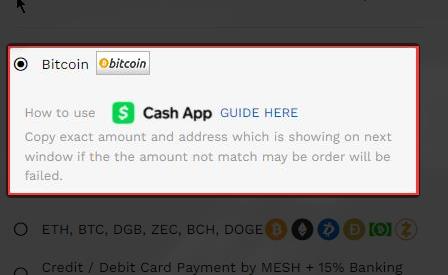
  • ●Choose Bitcoin (BTC or XBT is Bitcoin), and NOT Bitcoin Cash (Because BCH is a different coin)
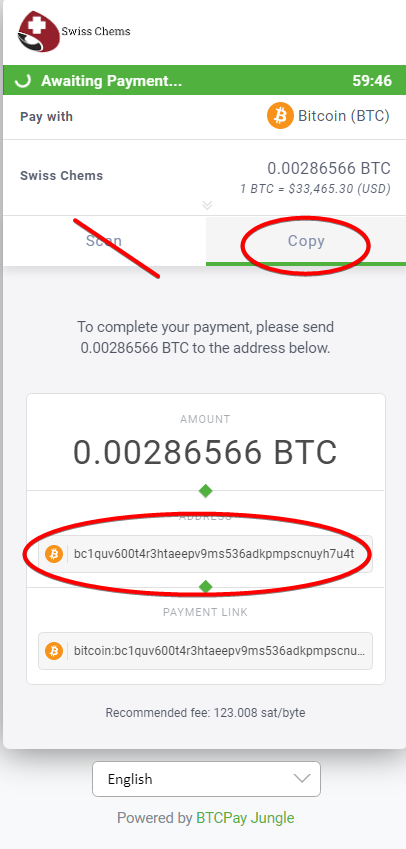
  • ● PLEASE PLEASE – DO NOT USE THE SAMPLE BITCOIN WALLET ADDRESS BELOW, as it changes every time for specific orders, and if you for some reason sent it – your funds are forever burned and cannot be retrieved anymore and we will not be liable to get it back.
  • ● Make sure to COPY and NOT SCAN the alphanumeric wallet address seen below on the sample order.
  • ● Go back to your Cashapp and click/tap the BTC currency and withdraw your payment to the assigned wallet address
  • ● Just wait for the order to process while waiting for the blockchain to get verified by the network (usually in 30mins)
  •  OPTIONAL: To further confirm of transmission of payment check this site and paste the assigned wallet for that payment on https://www.blockchain.com/

ALTERNATIVES:

TRUST WALLET

Create Wallet -make sure to save the wallet recovery phrases on paper. Buy Bitcoin with your Credit Card (minimum is $50 USD)How to buy with Bitcoin 9

SHAKEPAY (Canada Only)

The easiest way for Canadians to buy and sell bitcoin. Buy bitcoin in minutes with Interac e-Transfer®. Cash out to your bank account instantly. Customer service that cares.

KRAKEN (non US)

One of the fastest and easiest to use cryptocurrency providers yet. WITHDRAWAL FEE- 5USD The network fee must be included in sending BTC. BTC is also called XBT

KRAKEN

Make sure NOT to download Kraken Pro: Advanced Bitcoin & Crypto Trading (it’s specific for trading) and will just ask for an API before you can even login. Buy Bitcoin, and just add some network fees (typically its 2usd)

BITSTAMP

NOTE: Bitstamp Withdraw fee is about 0.0005 BTC (approx 15 USD)

Subscribe to receive our latest news.

85% of users stay up-to-date with our
newsletter.
Sign up & receive a 10% discount on your next
purchase!